

Coach Outlet has an online store where you can buy handbags, wallets and accessories. This guide shows two ways to buy from Coach Outlet and get your order to the Philippines with Buy&Ship: let our specialists place the order for you with proxy shopping, or check out yourself on the Canadian site and forward the parcel.
TL;DR | Key Points
・Method 1, proxy shopping: Paste the Coach Outlet product link into your Buy&Ship account and our specialist places the order for you.
・Method 2, forward it yourself: Check out on the Coach Outlet Canada site with the Buy&Ship Canada warehouse as the delivery address, then declare the parcel and forward it to the Philippines.
・Check your address: The Coach checkout may reformat the address automatically. Before you submit, make sure the second address line (your member code) is still there.
・Fees: Please refer to the proxy shopping page and the shipping rates page for the latest charges.
Contents (click to jump)
→ Method 1: Coach Outlet Proxy Shopping (4 Steps)
→ Method 2: Shop on Coach Outlet Canada and Forward to the Philippines (6 Steps)
→ FAQ
Method 1: Coach Outlet Proxy Shopping (4 Steps)
If you would rather not check out yourself, or your international credit card does not go through, you can use Buy&Ship proxy shopping. Our specialists place the order for you.
Step 1
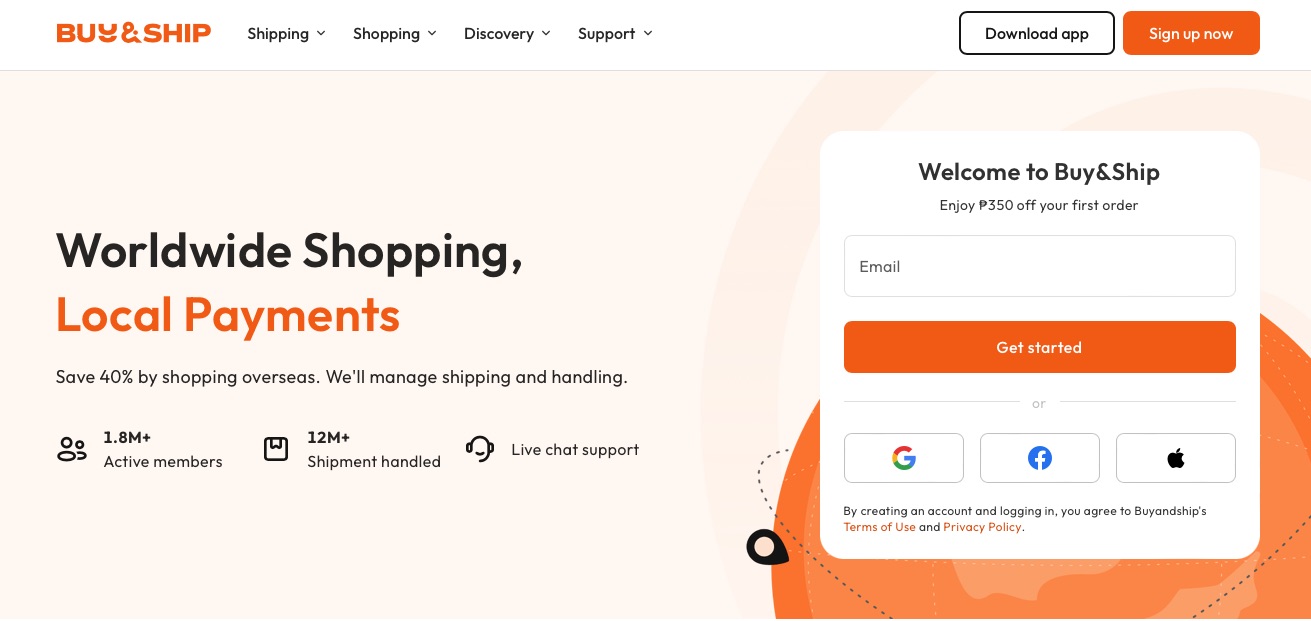
Log in to your Buy&Ship Member Centre and click “Add request”. If you do not have an account yet, sign up first.

Step 2
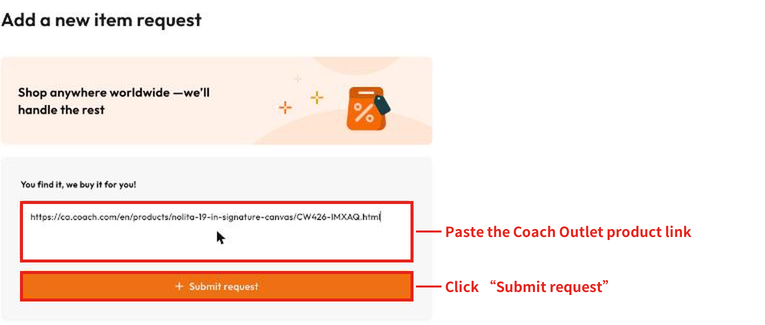
Go to the Coach Outlet site, copy the link of the product page you want, paste it into the box under “You find it, we buy it for you!” and click “Submit request”.
A preview page shows the estimated total cost of your request, including any service fee, before you submit. Shipping the item to the Philippines is charged separately.
Step 3
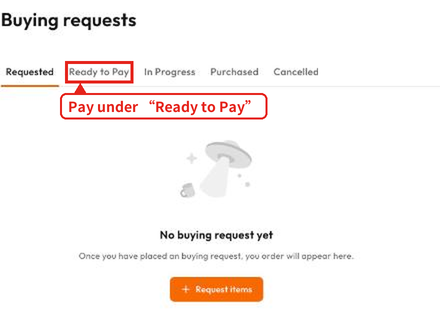
After you submit, wait for our specialist to confirm the request and arrange payment. Pay under the “Ready to Pay” tab on the Buying requests page. Our specialist then places the order and declares the parcel for you.
Step 4
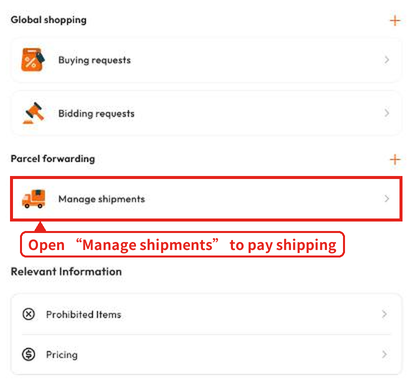
Once the parcel is ready to ship, go to Manage orders in your Member Centre and open “Manage shipments” to combine parcels and pay the shipping fee, then choose how you want to receive it.
For proxy shopping fees, please refer to the proxy shopping page. Please check the prohibited and restricted items page to see whether your item can be bought and shipped.
Method 2: Shop on Coach Outlet Canada and Forward to the Philippines (6 Steps)
- Sign up for a Buy&Ship account.
- Find the Canada warehouse details on the Overseas Warehouse Address page in your account: First Name, Last Name, Address (Line 1), Address (Line 2), City, Province, Postal Code and Tel.
- Before you buy, check the prohibited and restricted items list and the latest shipping rates.
Step 2
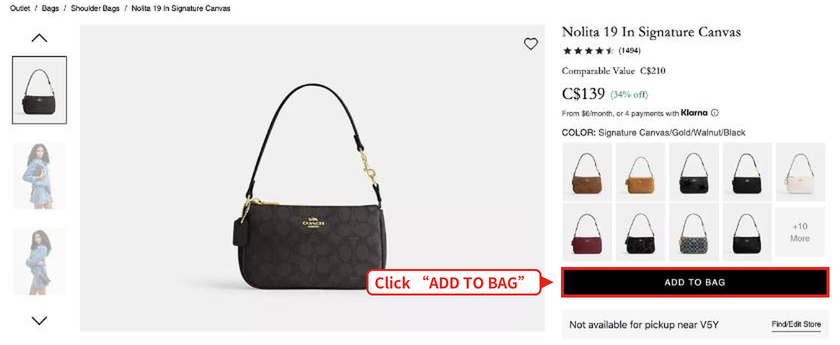
Go to the Coach Outlet Canada site, choose your bag and colour, then click “ADD TO BAG”.
Styles, prices, colours and stock change from time to time. Always refer to the Coach site.
Step 3
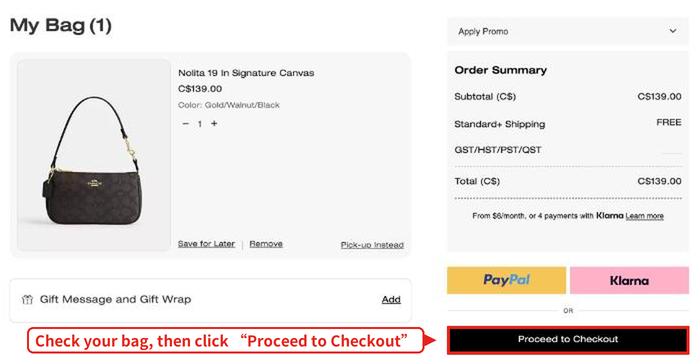
After adding the bag, click “View shopping bag” (or the bag icon at the top right) to open your bag. Check the item, colour and quantity, then click “Proceed to Checkout”.
Step 4
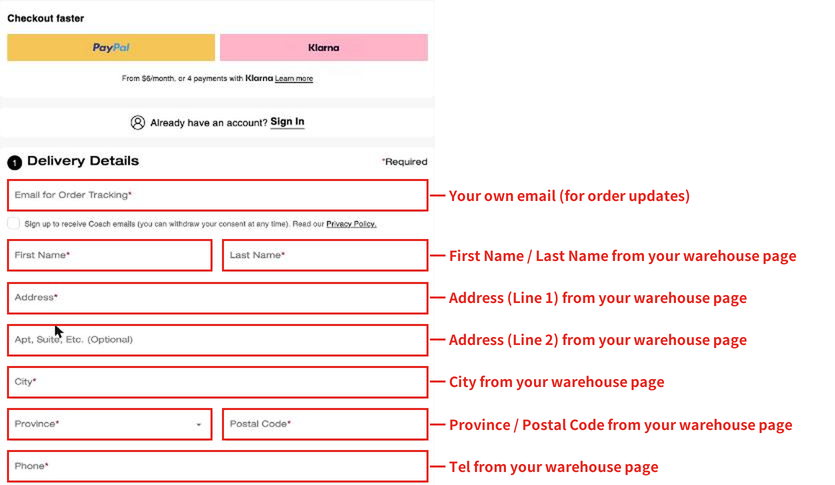
Fill in your delivery details under “Delivery Details”. Click “Enter Address Manually” first, then enter the Buy&Ship Canada warehouse details as shown in the screenshot.
Use an email address you check regularly. Order updates and shipping notifications are sent there.
Note: The Coach address field may reformat your address, for example by moving the unit number into the “Apt, Suite, Etc.” field. Before you submit, check that the delivery details match your warehouse page and that the second address line (your member code) has not been changed or removed.
Step 5
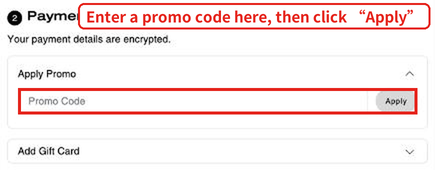
Click “Continue to payment” to move to the payment step. If you have a promo code, enter it under “Apply Promo” and click “Apply”.
Step 6
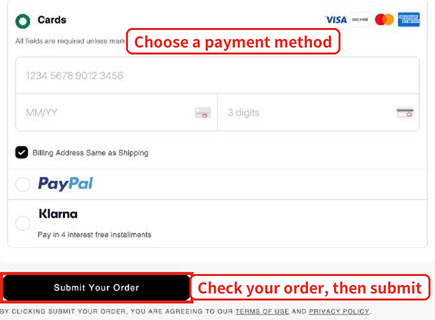
Choose a payment method (Cards, PayPal or Klarna) and enter the details. “Billing Address Same as Shipping” is ticked by default, which means the billing address is the same as the delivery address (the Buy&Ship Canada warehouse).
Once you have checked your order and delivery details, click “Submit Your Order” to place the order.
After your parcel arrives at the Buy&Ship Canada warehouse, log in to your account, declare the parcel and choose to forward it to the Philippines.
FAQ
What is the easiest way to buy from Coach Outlet in the Philippines?
Use Buy&Ship proxy shopping. Paste the product link into your account and our specialist confirms and places the order for you. See Method 1 above.
Can I forward items from the Coach Outlet Canada site to the Philippines?
Use the Buy&Ship Canada warehouse as your delivery address at checkout. Once the parcel arrives, declare it and choose forwarding. Please check the prohibited and restricted items page first to see whether your item can be forwarded.
How is the forwarding fee calculated?
Please refer to the Buy&Ship latest shipping rates page.
Further Reading
- Amazon Black Friday 2026: US/EU Sale Dates, Must-Buy Deals and Philippines Forwarding Guide
- Amazon Japan Black Friday 2026: Sale Dates, Must-Buy Deals and Philippines Forwarding Tips
- Lululemon Black Friday 2026: US/CA/AU/JP Price Comparison, Sale Picks & Shipping to the Philippines
- Olive Young Black Friday 2026: Starts Nov 1? Korea Site Proxy Shopping Guide for the Philippines + Must-Buys
- Coach Bag Philippines 2026 Must-Buy List|5 Trending Coach Bags + Coach US vs Philippines Price Comparison